
How It Works
agento-patronum registers hooks via Claude Code's plugin system. Three focused hooks work together to cover every path a protected file can travel.
Hook overview
| Hook event | Script | What it intercepts |
|---|---|---|
PreToolUse (file) | hooks/patronum-file-hook.js | Read, Write, Edit, MultiEdit, Glob, Grep tool calls |
PreToolUse (Bash) | hooks/patronum-bash-hook.js | Bash tool calls |
UserPromptSubmit | hooks/patronum-prompt-hook.js | @mention references in user prompts |
File patterns only ever run against file paths. Bash patterns only ever run against commands. This separation prevents false positives where a filename appearing as text in a shell argument would incorrectly trigger a file rule.
Hook flow
The diagram below shows the core interception pipeline — from Claude Code issuing a tool call to the final allow/block decision.
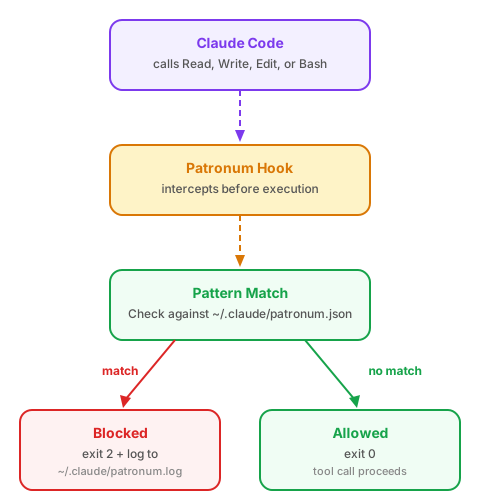
Step by step:
- Claude Code issues a tool call (e.g.
Read ~/.ssh/id_rsaorBash printenv) - The matching PreToolUse hook intercepts the call before it executes
- Pattern matching checks the target against the whitelist, then the blacklist in
~/.claude/patronum/patronum.json - If a whitelist pattern matches: the call is allowed immediately (exit code 0)
- If a blacklist pattern matches: the call is blocked (exit code 2) and logged to
~/.claude/patronum/patronum.log - If no pattern matches: the call is allowed (exit code 0) and proceeds normally
What the file hook receives
{
  "tool_name": "Read",
  "tool_input": {
    "file_path": "/Users/you/.ssh/id_rsa"
  }
}
What the Bash hook receives
{
  "tool_name": "Bash",
  "tool_input": {
    "command": "printenv"
  }
}
Pattern matching
For file patterns, the hook:
- Expands
~to$HOMEin both the pattern and the target path - Normalizes
**/for deep path matching - Converts the glob to a regular expression and tests it against the full path
For Bash commands, the hook:
- Checks if the command starts with the blocked command string
- Only
Bash(...)pattern entries are tested — file glob patterns are never applied to command strings
Blocking
When a pattern matches:
- Logs the violation to
~/.claude/patronum/patronum.log(JSONL) - Prints the violation reason to stderr (shown to Claude)
- Exits with code 2 (tells Claude Code to block the tool call or prompt)
@mention interception
PreToolUse covers tool calls — but there is a second path a file can travel.
Claude Code lets you reference files inline using @ syntax:
whats in @stack/.env.localThis is intentionally useful: instead of letting Claude search for and read files on its own, you hand it exactly the context it needs upfront. Fewer tool calls, less token usage, faster responses, tighter scope.
The catch — when you send this, Claude Code injects the file contents directly into the conversation context before the agent even starts — no Read tool call is ever issued. This means PreToolUse hooks never fire, and without additional protection the file lands in the conversation silently.
To close this gap, patronum registers a UserPromptSubmit hook that intercepts the raw prompt before Claude processes it. patronum-prompt-hook.js receives:
{
  "hook_event_name": "UserPromptSubmit",
  "prompt": "whats in @stack/.env.local"
}
It extracts every @<path> token, resolves each to an absolute path, and checks it against the same file patterns used by the file hook. If a match is found, the prompt is blocked with exit code 2 before Claude processes it.
Scope and subagents
Hooks fire for the primary Claude Code agent process. Subagents, however, are independent processes that only inherit user-scope settings (~/.claude/settings.json). If patronum is installed only at project or local scope, subagent tool calls bypass all hooks entirely.
Installing at user scope ensures hooks fire for subagents too. Config resolution still merges all three levels (user, project, local) — so project and local blacklists and whitelists remain active even when the plugin activation comes from user scope. See Security Considerations for the full picture.
Dependencies
All hooks use only Node.js — no native dependencies, no npm packages. Node.js is already available wherever Claude Code runs.